mirror of
https://github.com/taobataoma/meanTorrent.git
synced 2026-01-18 21:32:23 +01:00

443 lines
25 KiB
Markdown
443 lines
25 KiB
Markdown
# meanTorrent - A Private BitTorrent Tracker CMS based on [meanjs/mean](https://github.com/meanjs/mean), and here is the [DEMO Site](http://mean.im)
|
|
|
|
meanTorrent is A Private __BitTorrent Tracker CMS__ with __Multilingual support__ and a full-stack JavaScript open-source solution,
|
|
which provides a solid starting point for [MongoDB](http://www.mongodb.org/), [Node.js](http://www.nodejs.org/), [Express](http://expressjs.com/),
|
|
and [AngularJS](http://angularjs.org/) based applications.
|
|
|
|
## Feature, Function, Screenshots First
|
|
|
|
- __Home page view__
|
|

|
|
- __Torrents list page view__
|
|

|
|
- __Torrent detail page view__
|
|

|
|
- __subtitle panel__
|
|

|
|
- __users list panel__
|
|

|
|
- __other torrents panel__
|
|

|
|
- __admin panel__
|
|

|
|
- __Upload page view__
|
|

|
|
- __Chat page view__
|
|

|
|
- __User status page view__
|
|

|
|
- __User score page view__
|
|

|
|
- __Invitation detail page view__
|
|

|
|
- __MessageBox page view__
|
|

|
|
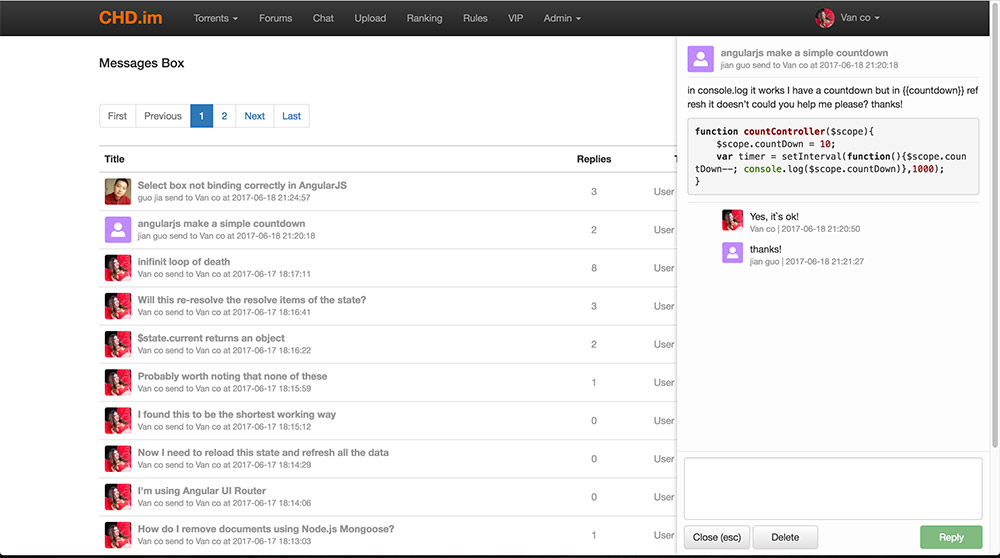
- __Message replies list page view__
|
|
|
|
- __Forums list page view__
|
|

|
|
- __Forum topics list page view__
|
|

|
|
- __Forum topic replies list page view__
|
|

|
|
- __Torrents maker group page__
|
|

|
|
- __Movie collection list page__
|
|

|
|
- __Movie collection detail page__
|
|

|
|
- __VIP Donate payment page__
|
|

|
|
- __Uploader access manager__
|
|

|
|
- __Follow list page__
|
|

|
|
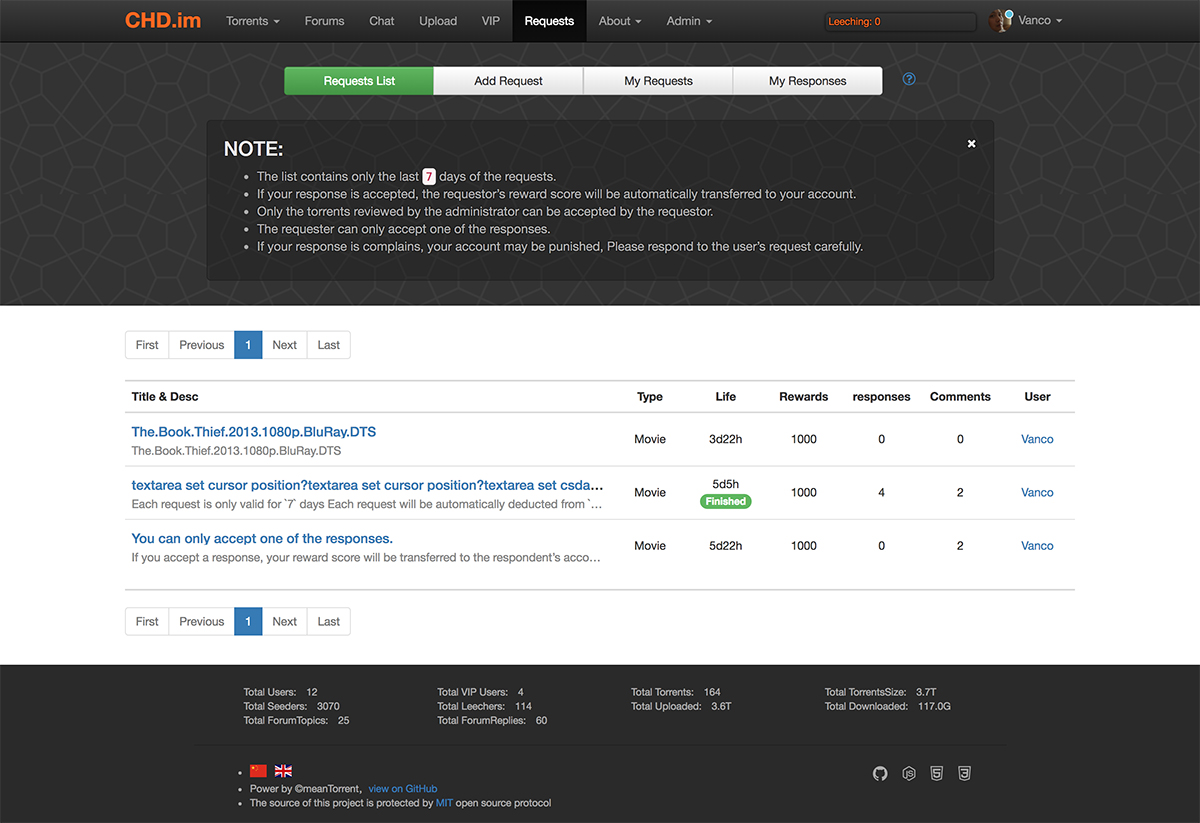
- __Requests list page__
|
|
|
|
- __Request view page__
|
|

|
|
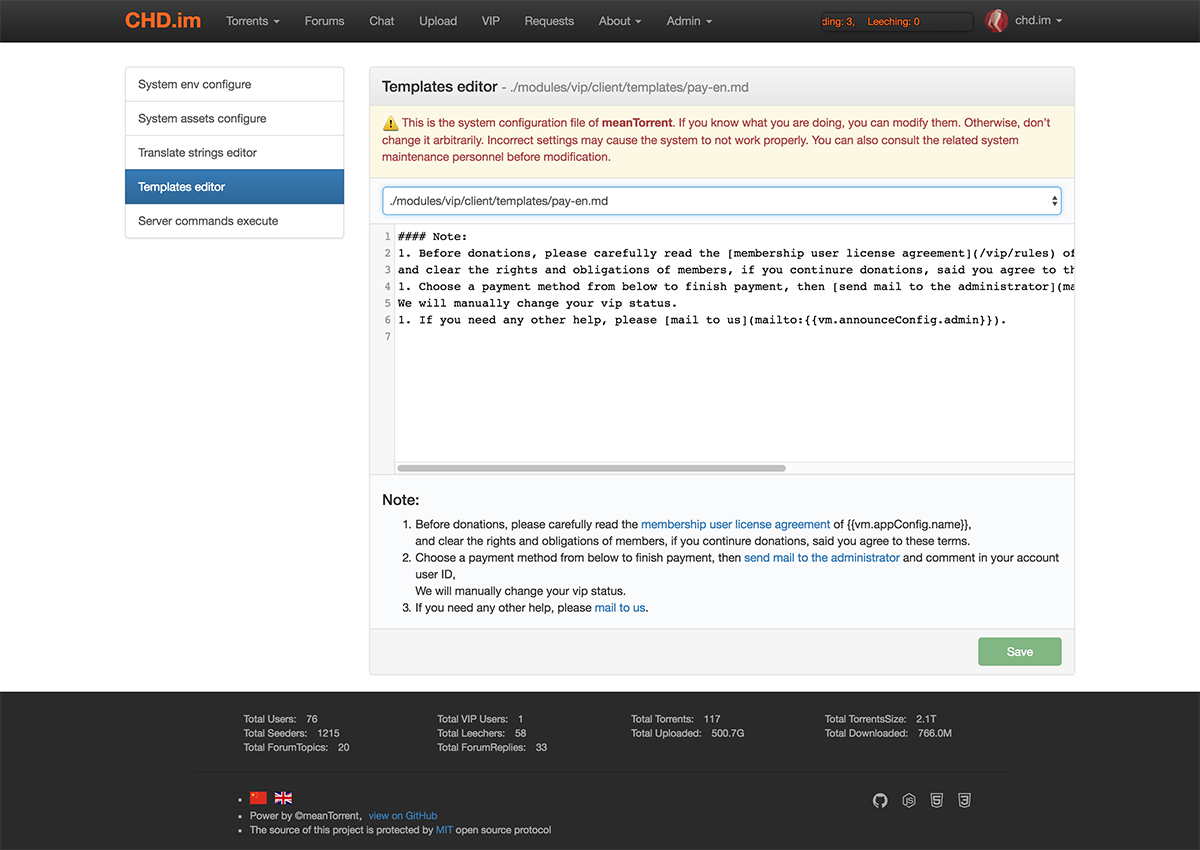
- __System control panel page__
|
|
|
|
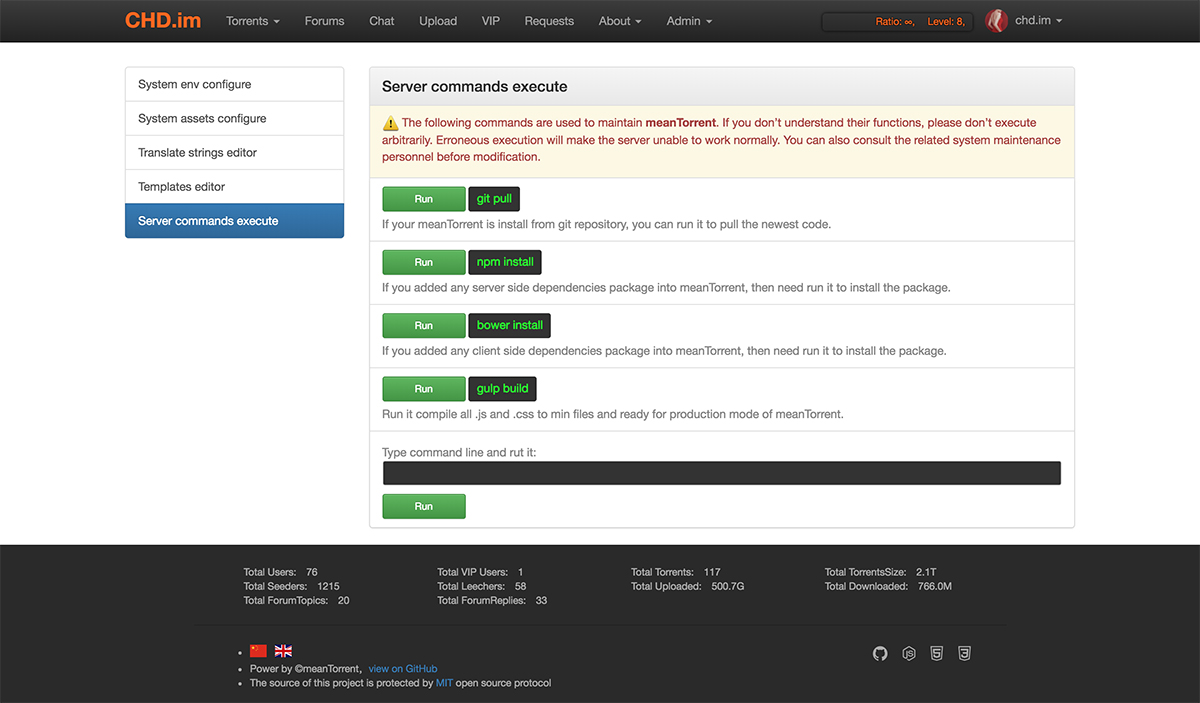
- __Shell command page__
|
|
|
|
|
|
#### meanTorrent some feature:
|
|
1. Multilingual support, now English & Chinese, please read the guide of [how to add a complete translated language](#howToAddTranslate).
|
|
2. When you want to upload a torrent, Only need to select a source torrent file,
|
|
and input the movie ID origin [TMDB](https://www.themoviedb.org), the movie detaill info will be autoload.
|
|
3. One torrent can boundle many attrs tag, It's the keyword to search filtering.
|
|
4. Torrent comment with full [markdown](https://guides.github.com/features/mastering-markdown/) style support.
|
|
5. Oper/Admin can manager users(edit/delete etc), forbidden user(banned).
|
|
6. OPer/Admin can manager torrents, can reviewed new torrents, set torrent sale type, set torrent recommend level, and delete torrent.
|
|
7. Global sale set support, It provides convenience for site preferential sales setting.
|
|
8. Client Black List support, user can not use the client list inside clientBlackList connect to the tracker server.
|
|
9. When user to change profile picture, meanTorrent use [ui-cropper](https://github.com/CrackerakiUA/ui-cropper) to crop the image.
|
|
10. The first sign up user auto be `admin` role.
|
|
11. User signed ip / leeched ip all in db, admin can forbid user if user`s ip too many.
|
|
12. Detailed user stats info, include account status, uploaded torrents list, seeding list, downloading list.
|
|
13. Complete user score system, user can use score exchange an invitation to invite friend register join.
|
|
14. Invitations manager, user can keep track of invited friends registration progress.
|
|
15. Admin/Oper can manual management the user`s uploaded/downloaded/score data.
|
|
16. Complete messageBox, include message list, read status, keys search, reply detail and [markdown](https://guides.github.com/features/mastering-markdown/) style support.
|
|
17. Complete forum function, admin can configure each forum section and section moderators, the content support [markdown](https://guides.github.com/features/mastering-markdown/) style.
|
|
18. Forum topics and replies can attach picture files and other type files, The picture file will be displayed automatically, Others file can only be downloaded.
|
|
19. Forum replies support real edit, What you see is what you get ([bootstrap-markdown](http://www.codingdrama.com/bootstrap-markdown/)), and drag & drop attach file upload.
|
|
20. Complete thumbs-up system(thanks system), topic poster or torrent uploader will received score donate from clicker.
|
|
21. __IRC Announce support [Node-irc](https://github.com/martynsmith/node-irc), when user upload new torrent file, and oper/admin reviewed it, then announce the torrent info to IRC channel.__
|
|
22. Scrape torrents status from owner tracker server, design for `public` CMS mode, support HTTP/HTTPS/UDP tracker protocol.
|
|
23. Complete HnR(hit and run) system support.
|
|
24. Oper/admin can send official invitation, but all the invitation has the expired time setting.
|
|
25. Complete music torrents support, include __CD__ and __MTV__ sub type.
|
|
26. Sports and variety type torrents support NOW!
|
|
27. Software, game, picture, ebook type torrents support NOW!
|
|
28. Admin can update or set users Vip attribute data manual in manage page.
|
|
29. Admin or oper can set torrent 'VIP' attribute, all these torrents only __VIP__ user can list and download.
|
|
30. Complete torrents maker group support, Admin can create a group and set a founder, and the founder can add or remove member users.
|
|
31. Complete movie collections support, Admin can create a collection and insert any movie into it, user can view collection and download all torrents of the collection.
|
|
32. Sort on torrent Vote, seeders, leechers, finished data on torrent list table head clicked events.
|
|
33. Simple vip donate payment function, support Paypal me, Alipay Qrcode and Weixin QRcode.
|
|
34. meanTorrent can backup mongo database into to a .tar files automatic at midnight everyday, and Admin can manage or download these files.
|
|
35. OrderBy torrent imdb vote or site vote in torrent list table header click.
|
|
36. User downloading progress bar or seeding status bar ([ngProgress](http://victorbjelkholm.github.io/ngProgress/)) in torrent list and home page.
|
|
37. User email verify and account active support, inactive account can not login and announce torrent data.
|
|
38. User can set a signature info for forum.
|
|
39. Auto get search movie/tvserial result from TMDB by keywords, user can select a result item to load resources info and upload.
|
|
40. Admin can configure to hide all menu header and footer count info for guest users, usefully for private tracker mode.
|
|
41. Complete emoji support in markdown content, The images for the emoji can be found in the [emoji-cheat-sheet](https://www.webpagefx.com/tools/emoji-cheat-sheet/).
|
|
42. Complete forum for vip and oper/admin users only, Special access forums not show to normal users.
|
|
43. Add 'All Newest Torrents' in resources type list option of torrent manage admin page, admin can directly management all newest torrents of all category.
|
|
44. New user status 'idle' for long time not login, idle user can not download and can not announce, user can active account with fixed score numbers.
|
|
45. Support anonymous uploader.
|
|
46. In forum, Admin/Moderators and topic owner can edit topic title through click on the title text.
|
|
47. New feature for list all uploader(maker group and user), admin can set uploader access to pass review directly when upload a torrent file.
|
|
48. Complete emoji support on chat room, message box.
|
|
49. Complete server auto notice function to users.
|
|
50. Complete RSS subscription support.
|
|
51. Complete user follow system.
|
|
52. Request system support. User can post a request to find any torrent and respond a request to upload torrent, rewards score support.
|
|
53. Global sales setting support, admin can redefined the upload and download ratio in sales, the value is priority to the torrent sales settings. And show global sales notice message at home page.
|
|
54. New feature for system control panel, only admin can edit markdown templates or system configure files online or execute some shell command online, but this is danger, if you do not understand it, don`t do it please.
|
|
55. Feature for user score getting. upload/download the older torrent get the higher score, the few seeding people got the higher score.
|
|
56. An examination tasks system to check user`s incremental uploaded, download and score value within a specified period of time, if the value failed to reach the standard, admin can banned them.
|
|
57. Add email white list, user can not to receive invite mail and active mail if the email domain not in the list.
|
|
|
|
#### Chat room feature:
|
|
1. Users name list
|
|
2. Oper/admin can kick(ban) user out of room
|
|
3. Support chat message font style(Font color, Bold style, Italic style) setting online
|
|
4. Banned user can not reconnect to chat server with an expires time(default one hour)
|
|
5. User can not repetitive login from another location at one time
|
|
6. Chat message bubble style
|
|
7. Complete emoji support by enter colon.
|
|
|
|
## TODO
|
|
- Fetch service email box message into administrator group message box of site, oper and admin can select any item to handling.
|
|
- Write user`s detail data of upload download and score into log db.
|
|
- Change curve with upload download and score of user`s account.
|
|
- Add configure item for whether ban user with his inviter.
|
|
- Add ban reason.
|
|
- Poll type topics support in forum.
|
|
- More score get methods.
|
|
- torrent more images from [TMDB](https://www.themoviedb.org)
|
|
- IRC chat
|
|
- Business cooperation support(like play box? NAS? etc.)
|
|
- ......more
|
|
|
|
## Online support
|
|
- Post an [issue](https://github.com/taobataoma/meanTorrent/issues)
|
|
- Email to [taobataoma](mailto:taobataoma@gmail.com)
|
|
- Skype ID: taobataoma
|
|
- Join [QQ](http://im.qq.com/) Group: 291843550
|
|
|
|
## Before You Begin
|
|
Before you begin we recommend you read about the basic building blocks that assemble a meanTorrent application:
|
|
* MongoDB - Go through [MongoDB Official Website](http://mongodb.org/) and proceed to their [Official Manual](http://docs.mongodb.org/manual/), which should help you understand NoSQL and MongoDB better.
|
|
* Express - The best way to understand express is through its [Official Website](http://expressjs.com/), which has a [Getting Started](http://expressjs.com/starter/installing.html) guide, as well as an [ExpressJS](http://expressjs.com/en/guide/routing.html) guide for general express topics. You can also go through this [StackOverflow Thread](http://stackoverflow.com/questions/8144214/learning-express-for-node-js) for more resources.
|
|
* AngularJS - Angular's [Official Website](http://angularjs.org/) is a great starting point. You can also use [Thinkster Popular Guide](http://www.thinkster.io/), and [Egghead Videos](https://egghead.io/).
|
|
* Node.js - Start by going through [Node.js Official Website](http://nodejs.org/) and this [StackOverflow Thread](http://stackoverflow.com/questions/2353818/how-do-i-get-started-with-node-js), which should get you going with the Node.js platform in no time.
|
|
|
|
## Prerequisites
|
|
Make sure you have installed all of the following prerequisites on your development machine:
|
|
* Git - [Download & Install Git](https://git-scm.com/downloads). OSX and Linux machines typically have this already installed.
|
|
* Node.js - [Download & Install Node.js](https://nodejs.org/en/download/) and the npm package manager. If you encounter any problems, you can also use this [GitHub Gist](https://gist.github.com/isaacs/579814) to install Node.js.
|
|
* MongoDB - [Download & Install MongoDB](http://www.mongodb.org/downloads), and make sure it's running on the default port (27017).
|
|
* Bower - You're going to use the [Bower Package Manager](http://bower.io/) to manage your front-end packages. Make sure you've installed Node.js and npm first, then install bower globally using npm:
|
|
|
|
```bash
|
|
$ npm install -g bower
|
|
```
|
|
|
|
## Downloading meanTorrent
|
|
There are several ways you can get the meanTorrent boilerplate:
|
|
|
|
### Cloning The GitHub Repository
|
|
The recommended way to get meanTorrent is to use git to directly clone the meanTorrent repository:
|
|
|
|
```bash
|
|
$ git clone https://github.com/taobataoma/meanTorrent.git
|
|
```
|
|
|
|
This will clone the latest version of the meanTorrent repository to a **meanTorrent** folder.
|
|
|
|
### Downloading The Repository Zip File
|
|
Another way to use the MEAN.JS boilerplate is to download a zip copy from the [master branch on GitHub](https://github.com/taobataoma/meanTorrent/archive/master.zip). You can also do this using the `wget` command:
|
|
|
|
```bash
|
|
$ wget https://github.com/taobataoma/meanTorrent/archive/master.zip -O meanTorrent.zip; unzip meanTorrent.zip; rm meanTorrent.zip
|
|
```
|
|
|
|
Don't forget to rename **meanTorrent-master** after your project name.
|
|
|
|
## Quick Install
|
|
Once you've downloaded the boilerplate and installed all the prerequisites, you're just a few steps away from starting to develop your meanTorrent application.
|
|
|
|
The boilerplate comes pre-bundled with a `package.json` and `bower.json` files that contain the list of modules you need to start your application.
|
|
|
|
To install the dependencies, run this in the application folder from the command-line:
|
|
|
|
```bash
|
|
$ npm install
|
|
```
|
|
|
|
This command does a few things:
|
|
* First it will install the dependencies needed for the application to run.
|
|
* If you're running in a development environment, it will then also install development dependencies needed for testing and running your application.
|
|
* When the npm packages install process is over, npm will initiate a bower install command to install all the front-end modules needed for the application
|
|
* To update these packages later on, just run `npm update`
|
|
|
|
If install process show error info below:
|
|
|
|
`../node-icu-charset-detector.cpp:7:28: fatal error: unicode/ucsdet.h: No such file or directory`
|
|
|
|
then run this command to install libicu manual
|
|
|
|
`apt-get install libicu-dev` OR `yum install libicu-devel`
|
|
|
|
## Running Your Application
|
|
|
|
Run your application using npm:
|
|
|
|
```bash
|
|
$ npm start
|
|
```
|
|
|
|
Your application should run on port 3000 with the *development* environment configuration, so in your browser just go to [http://localhost:3000](http://localhost:3000)
|
|
|
|
That's it! Your application should be running. To proceed with your development, check the other sections in this documentation.
|
|
If you encounter any problems, try the Troubleshooting section.
|
|
|
|
Explore `config/env/development.js` for development environment configuration options.
|
|
|
|
### Running in Production mode
|
|
To run your application with *production* environment configuration:
|
|
|
|
```bash
|
|
$ npm run start:prod
|
|
```
|
|
|
|
Explore `config/env/production.js` for production environment configuration options.
|
|
|
|
### Running with TLS (SSL)
|
|
Application will start by default with secure configuration (SSL mode) turned on and listen on port 8443.
|
|
To run your application in a secure manner you'll need to use OpenSSL and generate a set of self-signed certificates. Unix-based users can use the following command:
|
|
|
|
```bash
|
|
$ npm run generate-ssl-certs
|
|
```
|
|
|
|
Windows users can follow instructions found [here](http://www.websense.com/support/article/kbarticle/How-to-use-OpenSSL-and-Microsoft-Certification-Authority).
|
|
After you've generated the key and certificate, place them in the *config/sslcerts* folder.
|
|
|
|
Finally, execute prod task `npm run start:prod`
|
|
* enable/disable SSL mode in production environment change the `secure` option in `config/env/production.js`
|
|
|
|
## Getting Started With meanTorrent
|
|
Before you to start the meanTorrent application, Please explore `config/env/torrent.js` for many environment configuration options, you can change all configuration items of you Caring,
|
|
such as:
|
|
|
|
```javascript
|
|
announce: {
|
|
url: 'http://mean.im/announce',
|
|
announcePrefix: '[mean.im].',
|
|
admin: 'admin@mean.im',
|
|
baseUrl: 'http://mean.im',
|
|
clientBlackListUrl: '/about/black'
|
|
},
|
|
```
|
|
meanTorrent tracker is private, please set the `announce.url` to your server url, then when user to upload torrent file, It will autocheck the torrent announce url whether matching as `announce.url`.
|
|
|
|
```javascript
|
|
tmdbConfig: {
|
|
//please change it to your api key from themoviedb.org
|
|
key: 'key from themoviedb.org',
|
|
},
|
|
```
|
|
|
|
Because meanTorrent autoload the movie info from [TMDB](https://www.themoviedb.org), so please to register yourself key and replace it to `tmdbConfig.key`.
|
|
|
|
```javascript
|
|
language: [
|
|
{name: 'en', index: 0, class: 'flag-icon-gb', title: 'English'},
|
|
{name: 'zh', index: 1, class: 'flag-icon-cn', title: '中文'}
|
|
],
|
|
```
|
|
Multilingual support, if you add a new translate string file, please add configuration here. The `name` is value of [ISO_639-1](https://en.wikipedia.org/wiki/List_of_ISO_639-1_codes),
|
|
The class is used origin [flag-icon-css](https://github.com/lipis/flag-icon-css), you can find flag icon at `/public/lib/flag-icon-css/flags/`.
|
|
|
|
```javascript
|
|
clientBlackList: [
|
|
{name: 'Transmission/2.93'},
|
|
{name: 'Mozilla'},
|
|
{name: 'AppleWebKit'},
|
|
{name: 'Safari'},
|
|
{name: 'Chrome'}
|
|
],
|
|
```
|
|
This is a client Black List, all the list client can not connect to the tracker server, you can add more if you unlike some client to connect.
|
|
And you can make a list page to tell users witch clients are unpopular.
|
|
|
|
```javascript
|
|
sign: {
|
|
openSignup: true,
|
|
signUpActiveTokenExpires: 60 * 60 * 1000 * 24,
|
|
allowSocialSignin: true,
|
|
showMenuHeaderForGuest, true
|
|
},
|
|
```
|
|
```javascript
|
|
invite: {
|
|
openInvite: true,
|
|
scoreExchange: 10000,
|
|
expires: 60 * 60 * 1000 * 24
|
|
},
|
|
|
|
```
|
|
If your site do not accept user free register, please set `openSignup` to `false`, then user only can register through friend invitation or system(admin/oper) invitation.
|
|
if you set `openInvite` to `true`, the normal user can invite friends to join, if `false` only oper/admin can invite users.
|
|
|
|
All the sign up account need verify & active by mail, and must completed within the set time `signUpActiveTokenExpires`.
|
|
|
|
`showMenuHeaderForGuest` is setting whether show menu header for guest user, if you do not want the menu header showing for guest, please set to `false`.
|
|
|
|
```javascript
|
|
ircAnnounce: {
|
|
enable: true,
|
|
debug: false,
|
|
server: 'irc.mean.im',
|
|
port: 16667,
|
|
nick: 'meanAnnouncer',
|
|
userName: 'meanTorrent',
|
|
realName: 'IRC announce client',
|
|
channel: '#meanAnnounce',
|
|
showErrors: true,
|
|
autoRejoin: true,
|
|
autoConnect: true,
|
|
retryCount: 86400,
|
|
retryDelay: 5000,
|
|
encoding: 'UTF-8'
|
|
},
|
|
```
|
|
Now, IRC announce support [Node-irc](https://github.com/martynsmith/node-irc), this function can be used on rtorrent client, if match some words, the download client can add the torrent into download task list automatic.
|
|
|
|
```javascript
|
|
app: {
|
|
showDemoWarningPopup: true
|
|
showDebugLog: true
|
|
},
|
|
sign: {
|
|
showDemoSignMessage: true
|
|
},
|
|
```
|
|
If you started meanTorrent at `production` env, please set `showDemoWarningPopup` and `showDemoSignMessage` to `false`, this will not show demo message any where.
|
|
and you can set `showDebugLog` to `false`, then the `console.log` info is not output.
|
|
|
|
```javascript
|
|
hitAndRun: {
|
|
condition: {
|
|
seedTime: 24 * 60 * 60 * 1000 * 7,
|
|
ratio: 1.5
|
|
},
|
|
forbiddenDownloadMinWarningNumber: 3,
|
|
scoreToRemoveWarning: 10000
|
|
},
|
|
```
|
|
meanTorrent support complete HnR(hit and run) system, if user download a HnR torrent, then must seeding days of `contition.seedTime` or
|
|
the upload ratio more than `contition.ratio`, otherwise, the user will get a HnR warning, if the warning numbers is more than `forbiddenDownloadMinWarningNumber`,
|
|
then the user can not download any torrent. but can continue the warning torrent and seed it until the warning disappears,
|
|
and the user can remove a warning by score number of `scoreToRemoveWarning` or donate a VIP qualifications.
|
|
|
|
```javascript
|
|
backup: {
|
|
enable: true,
|
|
dir: './modules/backup/client/backup/'
|
|
|
|
}
|
|
```
|
|
meanTorrent can backup mongo database into to a .tar files automatic at midnight everyday, and Admin/Oper can manage or download these files.
|
|
if you want to disabled this feature, please set `enable` to `false`, `dir` is the saved path.
|
|
|
|
#### mail sender configure
|
|
meanTorrent need send mail to user when restore password, send invitations etc. before send these mail, you need change the mail options in file `config/env/development.js` and `config/env/production.js`,
|
|
meanTorrent used module `nodemailer`, if you have any config question you can find at [nodemailer](https://nodemailer.com/about/).
|
|
|
|
```javascript
|
|
mailer: {
|
|
from: process.env.MAILER_FROM || 'admin@domain.com',
|
|
options: {
|
|
service: process.env.MAILER_SERVICE_PROVIDER || 'Gmail',
|
|
imap: process.env.MAILER_IMAP || 'imap.gmail.com',
|
|
auth: {
|
|
user: process.env.MAILER_EMAIL_ID || 'username@gmail.com',
|
|
pass: process.env.MAILER_PASSWORD || 'mailpassword'
|
|
}
|
|
}
|
|
},
|
|
```
|
|
## <a name='howToAddTranslate'>How to add translated language
|
|
1. Copy a translate string original file from `modules/core/client/app/trans-string-en.js` to your want named file, such as 'trans-string-fr.js', and then translate all the strings.
|
|
2. Add new language configure item in `config/env/torrent.js`.
|
|
```javascript
|
|
language: [
|
|
{name: 'en', index: 0, class: 'flag-icon-gb', title: 'English'},
|
|
{name: 'zh', index: 1, class: 'flag-icon-cn', title: '中文'},
|
|
{name: 'fr', index: 2, class: 'flag-icon-fr', title: 'Français'} // this is added new language configure
|
|
],
|
|
```
|
|
Note: the `name` is value of [ISO_639-1](https://en.wikipedia.org/wiki/List_of_ISO_639-1_codes),
|
|
The class is used origin [flag-icon-css](https://github.com/lipis/flag-icon-css),
|
|
you can find flag icon at `/public/lib/flag-icon-css/flags/`.
|
|
|
|
3. Copy and translate all the .md files in `modules/*/client/templates/*.md`, notice the naming rules of files please, these files can edit online now.
|
|
4. meanTorrent used richtext box of [bootstrap-markdown](http://www.codingdrama.com/bootstrap-markdown/), It has already translated some
|
|
language, you can find them at `/public/lib/bootstrap-markdown/locale/`, then inset into config file `/config/assets/default.js` and `/config/assets/production.js`, such as:
|
|
```javascript
|
|
//bootstrap-markdown
|
|
'public/lib/bootstrap-markdown/js/bootstrap-markdown.js',
|
|
'public/lib/bootstrap-markdown/locale/bootstrap-markdown.zh.js',
|
|
'public/lib/bootstrap-markdown/locale/bootstrap-markdown.fr.js', // this is added new line
|
|
```
|
|
Note: If you can not find you wanted language file, you can copy and translate and config it.
|
|
|
|
5. Restart meanTorrent.
|
|
|
|
## Deploying to PAAS
|
|
|
|
### Deploying meanTorrent To Heroku
|
|
|
|
By clicking the button below you can signup for Heroku and deploy a working copy of meanTorrent to the cloud without having to do the steps above.
|
|
|
|
[](https://heroku.com/deploy)
|
|
|
|
### Amazon S3 configuration
|
|
|
|
To save the profile images to S3, simply set those environment variables:
|
|
```javascript
|
|
UPLOADS_STORAGE: s3
|
|
S3_BUCKET: the name of the bucket where the images will be saved
|
|
S3_ACCESS_KEY_ID: Your S3 access key
|
|
S3_SECRET_ACCESS_KEY: Your S3 access key password
|
|
```
|
|
|
|
## License
|
|
[The MIT License](LICENSE.md)
|