mirror of
https://github.com/taobataoma/meanTorrent.git
synced 2026-03-03 18:51:09 +01:00

425 lines
23 KiB
Markdown
425 lines
23 KiB
Markdown
# meanTorrent - A Private BitTorrent Tracker CMS based on [meanjs/mean](https://github.com/meanjs/mean), and here is the [DEMO Site](http://chd.im:3000)
|
|
|
|
meanTorrent is A Private __BitTorrent Tracker CMS__ with __Multilingual support__ and a full-stack JavaScript open-source solution,
|
|
which provides a solid starting point for [MongoDB](http://www.mongodb.org/), [Node.js](http://www.nodejs.org/), [Express](http://expressjs.com/),
|
|
and [AngularJS](http://angularjs.org/) based applications.
|
|
|
|
## Feature, Function, Screenshots First
|
|
|
|
- __Home page view__
|
|

|
|
- __Torrents list page view__
|
|

|
|
- __Torrent detail page view__
|
|

|
|
- __subtitle panel__
|
|

|
|
- __users list panel__
|
|

|
|
- __other torrents panel__
|
|

|
|
- __admin panel__
|
|

|
|
- __Upload page view__
|
|

|
|
- __Chat page view__
|
|

|
|
- __User status page view__
|
|

|
|
- __User score page view__
|
|

|
|
- __Invitation detail page view__
|
|

|
|
- __MessageBox page view__
|
|

|
|
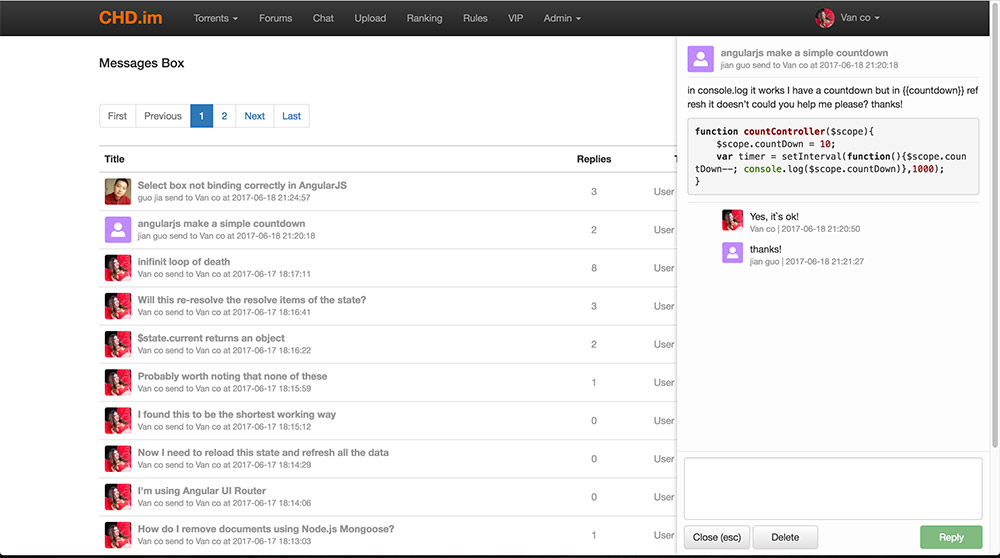
- __Message replies list page view__
|
|
|
|
- __Forums list page view__
|
|

|
|
- __Forum topics list page view__
|
|

|
|
- __Forum topic replies list page view__
|
|

|
|
- __Torrents maker group page__
|
|

|
|
- __Movie collection list page__
|
|

|
|
- __Movie collection detail page__
|
|

|
|
- __VIP Donate payment page__
|
|

|
|
- __Uploader access manager__
|
|

|
|
|
|
#### meanTorrent some feature:
|
|
1. Multilingual support, now English & Chinese, please read the guide of [how to add a complete translated language](#howToAddTranslate).
|
|
2. When you want to upload a torrent, Only need to select a source torrent file,
|
|
and input the movie ID origin [TMDB](https://www.themoviedb.org), the movie detaill info will be autoload.
|
|
3. One torrent can boundle many attrs tag, It's the keyword to search filtering.
|
|
4. Torrent comment with full [markdown](https://guides.github.com/features/mastering-markdown/) style support.
|
|
5. Oper/Admin can manager users(edit/delete etc), forbidden user(banned).
|
|
6. OPer/Admin can manager torrents, can reviewed new torrents, set torrent sale type, set torrent recommend level, and delete torrent.
|
|
7. Global sale set support, It provides convenience for site preferential sales setting.
|
|
8. Client Black List support, user can not use the client list inside clientBlackList connect to the tracker server.
|
|
9. When user to change profile picture, meanTorrent use [ui-cropper](https://github.com/CrackerakiUA/ui-cropper) to crop the image.
|
|
10. The first sign up user auto be `admin` role.
|
|
11. User signed ip / leeched ip all in db, admin can forbid user if user`s ip too many.
|
|
12. Detailed user stats info, include account status, uploaded torrents list, seeding list, downloading list.
|
|
13. Complete user score system, user can use score exchange an invitation to invite friend register join.
|
|
14. Invitations manager, user can keep track of invited friends registration progress.
|
|
15. Admin/Oper can manual management the user`s uploaded/downloaded/score data.
|
|
16. Complete messageBox, include message list, read status, keys search, reply detail and [markdown](https://guides.github.com/features/mastering-markdown/) style support.
|
|
17. Complete forum function, admin can configure each forum section and section moderators, the content support [markdown](https://guides.github.com/features/mastering-markdown/) style.
|
|
18. Forum topics and replies can attach picture files and other type files, The picture file will be displayed automatically, Others file can only be downloaded.
|
|
19. Forum replies support real edit, What you see is what you get ([bootstrap-markdown](http://www.codingdrama.com/bootstrap-markdown/)), and drag & drop attach file upload.
|
|
20. Complete thumbs-up system(thanks system), topic poster or torrent uploader will received score donate from clicker.
|
|
21. __IRC Announce support [Node-irc](https://github.com/martynsmith/node-irc), when user upload new torrent file, and oper/admin reviewed it, then announce the torrent info to IRC channel.__
|
|
22. Scrape torrents status from owner tracker server, design for `public` CMS mode, support HTTP/HTTPS/UDP tracker protocol.
|
|
23. Complete HnR(hit and run) system support.
|
|
24. Oper/admin can send official invitation, but all the invitation has the expired time setting.
|
|
25. Complete music torrents support, include __CD__ and __MTV__ sub type.
|
|
26. Sports and variety type torrents support NOW!
|
|
27. Software, game, picture, ebook type torrents support NOW!
|
|
28. Admin can update or set users Vip attribute data manual in manage page.
|
|
29. Admin or oper can set torrent 'VIP' attribute, all these torrents only __VIP__ user can list and download.
|
|
30. Complete torrents maker group support, Admin can create a group and set a founder, and the founder can add or remove member users.
|
|
31. Complete movie collections support, Admin can create a collection and insert any movie into it, user can view collection and download all torrents of the collection.
|
|
32. Sort on torrent Vote, seeders, leechers, finished data on torrent list table head clicked events.
|
|
33. Simple vip donate payment function, support Paypal me, Alipay Qrcode and Weixin QRcode.
|
|
34. meanTorrent can backup mongo database into to a .tar files automatic at midnight everyday, and Admin can manage or download these files.
|
|
35. OrderBy torrent imdb vote or site vote in torrent list table header click.
|
|
36. User downloading progress bar or seeding status bar ([ngProgress](http://victorbjelkholm.github.io/ngProgress/)) in torrent list and home page.
|
|
37. User email verify and account active support, inactive account can not login and announce torrent data.
|
|
38. User can set a signature info for forum.
|
|
39. Auto get search movie/tvserial result from TMDB by keywords, user can select a result item to load resources info and upload.
|
|
40. Admin can configure to hide all menu header and footer count info for guest users, usefully for private tracker mode.
|
|
41. Complete emoji support in markdown content, The images for the emoji can be found in the [emoji-cheat-sheet](https://www.webpagefx.com/tools/emoji-cheat-sheet/).
|
|
42. Complete forum for vip and oper/admin users only, Special access forums not show to normal users.
|
|
43. Add 'All Newest Torrents' in resources type list option of torrent manage admin page, admin can directly management all newest torrents of all category.
|
|
44. New user status 'idle' for long time not login, idle user can not download and can not announce, user can active account with fixed score numbers.
|
|
45. Support anonymous uploader.
|
|
46. In forum, Admin/Moderators and topic owner can edit topic title through click on the title text.
|
|
47. New feature for list all uploader(maker group and user), admin can set uploader access to pass review directly when upload a torrent file.
|
|
48. Complete emoji support on chat room, message box.
|
|
49. Complete server auto notice function to users.
|
|
50. Complete RSS subscription support.
|
|
|
|
#### Chat room feature:
|
|
1. Users name list
|
|
2. Oper/admin can kick(ban) user out of room
|
|
3. Support chat message font style(Font color, Bold style, Italic style) setting online
|
|
4. Banned user can not reconnect to chat server with an expires time(default one hour)
|
|
5. User can not repetitive login from another location at one time
|
|
6. Chat message bubble style
|
|
7. Complete emoji support by enter colon.
|
|
|
|
## TODO
|
|
- Users follow(friend) support.
|
|
- Poll type topics support in forum.
|
|
- Request system
|
|
- More score get methods.
|
|
- torrent more images from [TMDB](https://www.themoviedb.org)
|
|
- IRC chat
|
|
- Business cooperation support(like play box? NAS? etc.)
|
|
- ......more
|
|
|
|
## Online support
|
|
- Post an [issue](https://github.com/taobataoma/meanTorrent/issues)
|
|
- Email to [taobataoma](mailto:taobataoma@gmail.com)
|
|
- Skype ID: taobataoma
|
|
- Join [QQ](http://im.qq.com/) Group: 291843550
|
|
|
|
## Before You Begin
|
|
Before you begin we recommend you read about the basic building blocks that assemble a meanTorrent application:
|
|
* MongoDB - Go through [MongoDB Official Website](http://mongodb.org/) and proceed to their [Official Manual](http://docs.mongodb.org/manual/), which should help you understand NoSQL and MongoDB better.
|
|
* Express - The best way to understand express is through its [Official Website](http://expressjs.com/), which has a [Getting Started](http://expressjs.com/starter/installing.html) guide, as well as an [ExpressJS](http://expressjs.com/en/guide/routing.html) guide for general express topics. You can also go through this [StackOverflow Thread](http://stackoverflow.com/questions/8144214/learning-express-for-node-js) for more resources.
|
|
* AngularJS - Angular's [Official Website](http://angularjs.org/) is a great starting point. You can also use [Thinkster Popular Guide](http://www.thinkster.io/), and [Egghead Videos](https://egghead.io/).
|
|
* Node.js - Start by going through [Node.js Official Website](http://nodejs.org/) and this [StackOverflow Thread](http://stackoverflow.com/questions/2353818/how-do-i-get-started-with-node-js), which should get you going with the Node.js platform in no time.
|
|
|
|
## Prerequisites
|
|
Make sure you have installed all of the following prerequisites on your development machine:
|
|
* Git - [Download & Install Git](https://git-scm.com/downloads). OSX and Linux machines typically have this already installed.
|
|
* Node.js - [Download & Install Node.js](https://nodejs.org/en/download/) and the npm package manager. If you encounter any problems, you can also use this [GitHub Gist](https://gist.github.com/isaacs/579814) to install Node.js.
|
|
* MongoDB - [Download & Install MongoDB](http://www.mongodb.org/downloads), and make sure it's running on the default port (27017).
|
|
* Bower - You're going to use the [Bower Package Manager](http://bower.io/) to manage your front-end packages. Make sure you've installed Node.js and npm first, then install bower globally using npm:
|
|
|
|
```bash
|
|
$ npm install -g bower
|
|
```
|
|
|
|
## Downloading meanTorrent
|
|
There are several ways you can get the meanTorrent boilerplate:
|
|
|
|
### Cloning The GitHub Repository
|
|
The recommended way to get meanTorrent is to use git to directly clone the meanTorrent repository:
|
|
|
|
```bash
|
|
$ git clone https://github.com/taobataoma/meanTorrent.git
|
|
```
|
|
|
|
This will clone the latest version of the meanTorrent repository to a **meanTorrent** folder.
|
|
|
|
### Downloading The Repository Zip File
|
|
Another way to use the MEAN.JS boilerplate is to download a zip copy from the [master branch on GitHub](https://github.com/taobataoma/meanTorrent/archive/master.zip). You can also do this using the `wget` command:
|
|
|
|
```bash
|
|
$ wget https://github.com/taobataoma/meanTorrent/archive/master.zip -O meanTorrent.zip; unzip meanTorrent.zip; rm meanTorrent.zip
|
|
```
|
|
|
|
Don't forget to rename **meanTorrent-master** after your project name.
|
|
|
|
## Quick Install
|
|
Once you've downloaded the boilerplate and installed all the prerequisites, you're just a few steps away from starting to develop your meanTorrent application.
|
|
|
|
The boilerplate comes pre-bundled with a `package.json` and `bower.json` files that contain the list of modules you need to start your application.
|
|
|
|
To install the dependencies, run this in the application folder from the command-line:
|
|
|
|
```bash
|
|
$ npm install
|
|
```
|
|
|
|
This command does a few things:
|
|
* First it will install the dependencies needed for the application to run.
|
|
* If you're running in a development environment, it will then also install development dependencies needed for testing and running your application.
|
|
* When the npm packages install process is over, npm will initiate a bower install command to install all the front-end modules needed for the application
|
|
* To update these packages later on, just run `npm update`
|
|
|
|
If install process show error info below:
|
|
|
|
`../node-icu-charset-detector.cpp:7:28: fatal error: unicode/ucsdet.h: No such file or directory`
|
|
|
|
then run this command to install libicu manual
|
|
|
|
`apt-get install libicu-dev` OR `yum install libicu-devel`
|
|
|
|
## Running Your Application
|
|
|
|
Run your application using npm:
|
|
|
|
```bash
|
|
$ npm start
|
|
```
|
|
|
|
Your application should run on port 3000 with the *development* environment configuration, so in your browser just go to [http://localhost:3000](http://localhost:3000)
|
|
|
|
That's it! Your application should be running. To proceed with your development, check the other sections in this documentation.
|
|
If you encounter any problems, try the Troubleshooting section.
|
|
|
|
Explore `config/env/development.js` for development environment configuration options.
|
|
|
|
### Running in Production mode
|
|
To run your application with *production* environment configuration:
|
|
|
|
```bash
|
|
$ npm run start:prod
|
|
```
|
|
|
|
Explore `config/env/production.js` for production environment configuration options.
|
|
|
|
### Running with TLS (SSL)
|
|
Application will start by default with secure configuration (SSL mode) turned on and listen on port 8443.
|
|
To run your application in a secure manner you'll need to use OpenSSL and generate a set of self-signed certificates. Unix-based users can use the following command:
|
|
|
|
```bash
|
|
$ npm run generate-ssl-certs
|
|
```
|
|
|
|
Windows users can follow instructions found [here](http://www.websense.com/support/article/kbarticle/How-to-use-OpenSSL-and-Microsoft-Certification-Authority).
|
|
After you've generated the key and certificate, place them in the *config/sslcerts* folder.
|
|
|
|
Finally, execute prod task `npm run start:prod`
|
|
* enable/disable SSL mode in production environment change the `secure` option in `config/env/production.js`
|
|
|
|
## Getting Started With meanTorrent
|
|
Before you to start the meanTorrent application, Please explore `config/env/torrent.js` for many environment configuration options, you can change all configuration items of you Caring,
|
|
such as:
|
|
|
|
```javascript
|
|
announce: {
|
|
url: 'http://chd.im/announce',
|
|
announcePrefix: '[CHD.im].',
|
|
admin: 'admin@chd.im',
|
|
baseUrl: 'http://chd.im',
|
|
clientBlackListUrl: '/about/black',
|
|
privateTorrentCmsMode: true
|
|
},
|
|
```
|
|
meanTorrent tracker is private, please set the `announce.url` to your server url, then when user to upload torrent file, It will autocheck the torrent announce url whether matching as `announce.url`.
|
|
But, meanTorrent support public tracker torrents CMS mode with `privateTorrentCmsMode` set to `false`, in `public` mode, user can upload and download public tracker torrent files, but these torrent files is can not
|
|
used by meanTorrent tracker server.
|
|
|
|
```javascript
|
|
tmdbConfig: {
|
|
//please change it to your api key from themoviedb.org
|
|
key: '7888f0042a366f63289ff571b68b7ce0',
|
|
},
|
|
```
|
|
|
|
Because meanTorrent autoload the movie info from [TMDB](https://www.themoviedb.org), so please to register yourself key and replace it to `tmdbConfig.key`.
|
|
|
|
```javascript
|
|
language: [
|
|
{name: 'en', index: 0, class: 'flag-icon-gb', title: 'English'},
|
|
{name: 'zh', index: 1, class: 'flag-icon-cn', title: '中文'}
|
|
],
|
|
```
|
|
Multilingual support, if you add a new translate string file, please add configuration here. The `name` is value of [ISO_639-1](https://en.wikipedia.org/wiki/List_of_ISO_639-1_codes),
|
|
The class is used origin [flag-icon-css](https://github.com/lipis/flag-icon-css), you can find flag icon at `/public/lib/flag-icon-css/flags/`.
|
|
|
|
```javascript
|
|
clientBlackList: [
|
|
{name: 'Transmission/2.93'},
|
|
{name: 'Mozilla'},
|
|
{name: 'AppleWebKit'},
|
|
{name: 'Safari'},
|
|
{name: 'Chrome'}
|
|
],
|
|
```
|
|
This is a client Black List, all the list client can not connect to the tracker server, you can add more if you unlike some client to connect.
|
|
And you can make a list page to tell users witch clients are unpopular.
|
|
|
|
```javascript
|
|
sign: {
|
|
openSignup: true,
|
|
signUpActiveTokenExpires: 60 * 60 * 1000 * 24,
|
|
allowSocialSignin: true,
|
|
showMenuHeaderForGuest, true
|
|
},
|
|
```
|
|
```javascript
|
|
invite: {
|
|
openInvite: true,
|
|
scoreExchange: 10000,
|
|
expires: 60 * 60 * 1000 * 24
|
|
},
|
|
|
|
```
|
|
If your site do not accept user free register, please set `openSignup` to `false`, then user only can register through friend invitation or system(admin/oper) invitation.
|
|
if you set `openInvite` to `true`, the normal user can invite friends to join, if `false` only oper/admin can invite users.
|
|
|
|
All the sign up account need verify & active by mail, and must completed within the set time `signUpActiveTokenExpires`.
|
|
|
|
`showMenuHeaderForGuest` is setting whether show menu header for guest user, if you do not want the menu header showing for guest, please set to `false`.
|
|
|
|
```javascript
|
|
ircAnnounce: {
|
|
enable: true,
|
|
debug: false,
|
|
server: 'chd.im',
|
|
port: 16667,
|
|
nick: 'chdAnnounce',
|
|
userName: 'meanTorrent',
|
|
realName: 'IRC announce client',
|
|
channel: '#chdAnnounce',
|
|
showErrors: true,
|
|
autoRejoin: true,
|
|
autoConnect: true,
|
|
retryCount: 86400,
|
|
retryDelay: 5000,
|
|
encoding: 'UTF-8'
|
|
},
|
|
```
|
|
Now, IRC announce support [Node-irc](https://github.com/martynsmith/node-irc), this function can be used on rtorrent client, if match some words, the download client can add the torrent into download task list automatic.
|
|
|
|
```javascript
|
|
app: {
|
|
showDemoWarningPopup: true
|
|
showDebugLog: true
|
|
},
|
|
sign: {
|
|
showDemoSignMessage: true
|
|
},
|
|
```
|
|
If you started meanTorrent at `production` env, please set `showDemoWarningPopup` and `showDemoSignMessage` to `false`, this will not show demo message any where.
|
|
and you can set `showDebugLog` to `false`, then the `console.log` info is not output.
|
|
|
|
```javascript
|
|
hitAndRun: {
|
|
condition: {
|
|
seedTime: 24 * 60 * 60 * 1000 * 7,
|
|
ratio: 1.5
|
|
},
|
|
forbiddenDownloadMinWarningNumber: 3,
|
|
scoreToRemoveWarning: 10000
|
|
},
|
|
```
|
|
meanTorrent support complete HnR(hit and run) system, if user download a HnR torrent, then must seeding days of `contition.seedTime` or
|
|
the upload ratio more than `contition.ratio`, otherwise, the user will get a HnR warning, if the warning numbers is more than `forbiddenDownloadMinWarningNumber`,
|
|
then the user can not download any torrent. but can continue the warning torrent and seed it until the warning disappears,
|
|
and the user can remove a warning by score number of `scoreToRemoveWarning` or donate a VIP qualifications.
|
|
|
|
```javascript
|
|
backup: {
|
|
enable: true,
|
|
dir: './modules/backup/client/backup/'
|
|
|
|
}
|
|
```
|
|
meanTorrent can backup mongo database into to a .tar files automatic at midnight everyday, and Admin/Oper can manage or download these files.
|
|
if you want to disabled this feature, please set `enable` to `false`, `dir` is the saved path.
|
|
|
|
#### mail sender configure
|
|
meanTorrent need send mail to user when restore password, send invitations etc. before send these mail, you need change the mail options in file `env/development.js` or `env/production.js`,
|
|
meanTorrent used module `nodemailer`, if you have any config question you can find at [nodemailer](https://nodemailer.com/about/).
|
|
|
|
```javascript
|
|
mailer: {
|
|
from: process.env.MAILER_FROM || 'admin@domain.com',
|
|
options: {
|
|
service: process.env.MAILER_SERVICE_PROVIDER || 'Gmail',
|
|
auth: {
|
|
user: process.env.MAILER_EMAIL_ID || 'username@gmail.com',
|
|
pass: process.env.MAILER_PASSWORD || 'mailpassword'
|
|
}
|
|
}
|
|
},
|
|
```
|
|
## <a name='howToAddTranslate'>How to add translated language
|
|
1. Copy a translate string original file from `modules/core/client/app/trans-string-en.js` to your want named file, such as 'trans-string-fr.js', and then translate all the strings.
|
|
2. Add new language configure item in `config/env/torrent.js`.
|
|
```javascript
|
|
language: [
|
|
{name: 'en', index: 0, class: 'flag-icon-gb', title: 'English'},
|
|
{name: 'zh', index: 1, class: 'flag-icon-cn', title: '中文'},
|
|
{name: 'fr', index: 2, class: 'flag-icon-fr', title: 'Français'} // this is added new language configure
|
|
],
|
|
```
|
|
Note: the `name` is value of [ISO_639-1](https://en.wikipedia.org/wiki/List_of_ISO_639-1_codes),
|
|
The class is used origin [flag-icon-css](https://github.com/lipis/flag-icon-css),
|
|
you can find flag icon at `/public/lib/flag-icon-css/flags/`.
|
|
|
|
3. Copy and translate all the .md files in `modules/*/client/templates/*.md`, notice the naming rules of files please.
|
|
4. meanTorrent used richtext box of [bootstrap-markdown](http://www.codingdrama.com/bootstrap-markdown/), It has already translated some
|
|
language, you can find them at `/public/lib/bootstrap-markdown/locale/`, then inset into config file `/config/assets/default.js` and `/config/assets/production.js`, such as:
|
|
```javascript
|
|
//bootstrap-markdown
|
|
'public/lib/bootstrap-markdown/js/bootstrap-markdown.js',
|
|
'public/lib/bootstrap-markdown/locale/bootstrap-markdown.zh.js',
|
|
'public/lib/bootstrap-markdown/locale/bootstrap-markdown.fr.js', // this is added new line
|
|
```
|
|
Note: If you can not find you wanted language file, you can copy and translate and config it.
|
|
|
|
5. Restart meanTorrent.
|
|
|
|
## Deploying to PAAS
|
|
|
|
### Deploying meanTorrent To Heroku
|
|
|
|
By clicking the button below you can signup for Heroku and deploy a working copy of meanTorrent to the cloud without having to do the steps above.
|
|
|
|
[](https://heroku.com/deploy)
|
|
|
|
### Amazon S3 configuration
|
|
|
|
To save the profile images to S3, simply set those environment variables:
|
|
```javascript
|
|
UPLOADS_STORAGE: s3
|
|
S3_BUCKET: the name of the bucket where the images will be saved
|
|
S3_ACCESS_KEY_ID: Your S3 access key
|
|
S3_SECRET_ACCESS_KEY: Your S3 access key password
|
|
```
|
|
|
|
## License
|
|
[The MIT License](LICENSE.md)
|