mirror of
https://github.com/taobataoma/meanTorrent.git
synced 2026-01-16 12:22:26 +01:00

246 lines
13 KiB
Markdown
246 lines
13 KiB
Markdown
# meanTorrent - A Private BitTorrent Tracker CMS, [DEMO Site](http://chd.im:3000)
|
|
|
|
meanTorrent is Based on [meanjs/mean](https://github.com/meanjs/mean)
|
|
|
|
more function is WIP, please wait...
|
|
==================================
|
|
|
|
meanTorrent is A Private __BitTorrent Tracker CMS__ with __Multilingual support__ and a full-stack JavaScript open-source solution, which provides a solid starting point for [MongoDB](http://www.mongodb.org/), [Node.js](http://www.nodejs.org/), [Express](http://expressjs.com/), and [AngularJS](http://angularjs.org/) based applications. The idea is to solve the common issues with connecting those frameworks, build a robust framework to support daily development needs, and help developers use better practices while working with popular JavaScript components.
|
|
|
|
## Feature, Function, Screenshots First
|
|
|
|
- __Home page view__
|
|

|
|
- __Torrents list page view__
|
|

|
|
- __Torrent detail page view__
|
|

|
|
- __subtitle panel__
|
|

|
|
- __users list panel__
|
|

|
|
- __other torrents panel__
|
|

|
|
- __admin panel__
|
|

|
|
- __Upload page view__
|
|

|
|
- __Chat page view__
|
|

|
|
- __User status page view__
|
|

|
|
- __User score page view__
|
|

|
|
- __Invitation detail page view__
|
|

|
|
- __MessageBox page view__
|
|

|
|
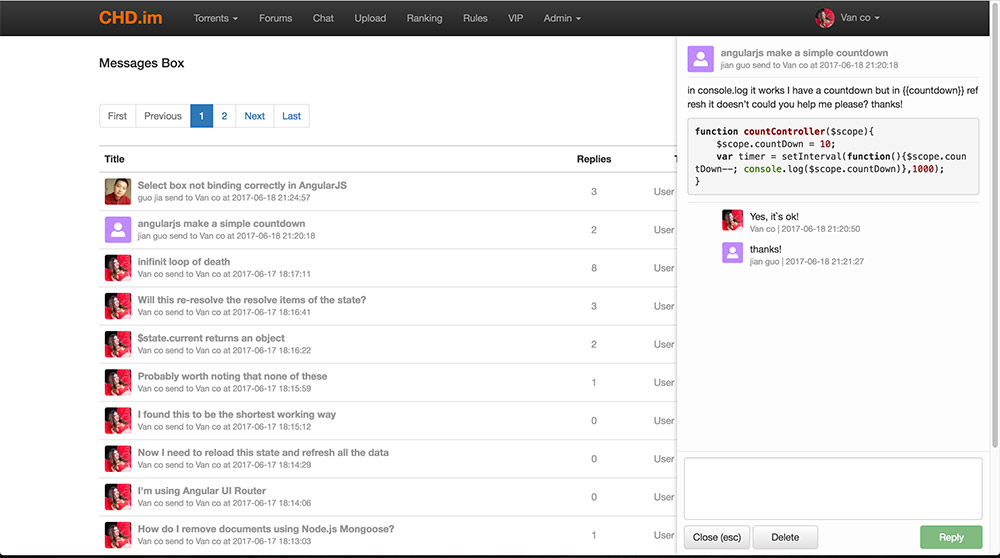
- __Message replies list page view__
|
|
|
|
|
|
#### meanTorrent some feature:
|
|
1. Multilingual support, now English & Chinese, you can Copy a string file `modules/core/client/app/trans-string-en.js` to translate it.
|
|
2. When you want to upload a torrent, Only need to select a source torrent file,
|
|
and input the movie ID origin [TMDB](https://www.themoviedb.org), the movie detaill info will be autoload.
|
|
3. One torrent can boundle many attrs tag, It's the key to search filtering.
|
|
4. Torrent comment with full [markdown](https://guides.github.com/features/mastering-markdown/) style support.
|
|
5. Oper/Admin can manager users(edit/delete etc), forbidden user(banned).
|
|
6. OPer/Admin can manager torrents, can reviewed new torrents, set torrent sale type, set torrent recommend level, and delete torrent.
|
|
7. Global sale set support, It provides convenience for site preferential sales setting.
|
|
8. Client Black List support, user can not use the client list inside clientBlackList connect to the tracker server.
|
|
9. When user to change profile picture, meanTorrent use [ui-cropper](https://github.com/CrackerakiUA/ui-cropper) to crop the image.
|
|
10. The first sign up user auto be `admin` role.
|
|
11. User signed ip / leeched ip all in db, admin can forbid user if user`s ip too many.
|
|
12. Detailed user stats info, include account status, uploaded torrents list, seeding list, downloading list.
|
|
13. Complete user score system, user can use score exchange an invitation to invite friend register join.
|
|
14. Invitations manager, user can keep track of invited friends registration progress.
|
|
15. Admin/Oper can manual management the user`s uploaded/downloaded/score data.
|
|
16. Complete messageBox, include message list, read status, keys search, reply detail and [markdown](https://guides.github.com/features/mastering-markdown/) style support.
|
|
|
|
#### Chat room feature:
|
|
1. Users name list
|
|
2. Oper/admin can kick(ban) user out of room
|
|
3. Support chat message font style(Font color, Bold style, Italic style) setting online
|
|
4. Banned user can not reconnect to chat server with an expires time(default one hour)
|
|
5. User can not repetitive login from another location at one time
|
|
6. Chat message bubble style
|
|
|
|
## TODO
|
|
- Other type torrent support(like TV serial, Music, Other).
|
|
- torrent more images from [TMDB](https://www.themoviedb.org)
|
|
- Forums function support.
|
|
- Subject support, like region subject, [IMDB](http://www.imdb.com) TOP 100 subject etc.
|
|
- VIP Donate function.
|
|
- Movie belongs to collection, user can list all movie torrents of the collection.
|
|
- Cast belongs to collection, user can list all movie torrents of the cast.
|
|
- Business cooperation support(like play box? NAS? etc.)
|
|
- ......more
|
|
|
|
## Online support
|
|
- Post an [issue](https://github.com/taobataoma/meanTorrent/issues)
|
|
- Email to [taobataoma](mailto:taobataoma@gmail.com)
|
|
- Join [QQ](http://im.qq.com/) Group: 291843550
|
|
|
|
## Before You Begin
|
|
Before you begin we recommend you read about the basic building blocks that assemble a meanTorrent application:
|
|
* MongoDB - Go through [MongoDB Official Website](http://mongodb.org/) and proceed to their [Official Manual](http://docs.mongodb.org/manual/), which should help you understand NoSQL and MongoDB better.
|
|
* Express - The best way to understand express is through its [Official Website](http://expressjs.com/), which has a [Getting Started](http://expressjs.com/starter/installing.html) guide, as well as an [ExpressJS](http://expressjs.com/en/guide/routing.html) guide for general express topics. You can also go through this [StackOverflow Thread](http://stackoverflow.com/questions/8144214/learning-express-for-node-js) for more resources.
|
|
* AngularJS - Angular's [Official Website](http://angularjs.org/) is a great starting point. You can also use [Thinkster Popular Guide](http://www.thinkster.io/), and [Egghead Videos](https://egghead.io/).
|
|
* Node.js - Start by going through [Node.js Official Website](http://nodejs.org/) and this [StackOverflow Thread](http://stackoverflow.com/questions/2353818/how-do-i-get-started-with-node-js), which should get you going with the Node.js platform in no time.
|
|
|
|
## Prerequisites
|
|
Make sure you have installed all of the following prerequisites on your development machine:
|
|
* Git - [Download & Install Git](https://git-scm.com/downloads). OSX and Linux machines typically have this already installed.
|
|
* Node.js - [Download & Install Node.js](https://nodejs.org/en/download/) and the npm package manager. If you encounter any problems, you can also use this [GitHub Gist](https://gist.github.com/isaacs/579814) to install Node.js.
|
|
* MongoDB - [Download & Install MongoDB](http://www.mongodb.org/downloads), and make sure it's running on the default port (27017).
|
|
* Bower - You're going to use the [Bower Package Manager](http://bower.io/) to manage your front-end packages. Make sure you've installed Node.js and npm first, then install bower globally using npm:
|
|
|
|
```bash
|
|
$ npm install -g bower
|
|
```
|
|
|
|
## Downloading meanTorrent
|
|
There are several ways you can get the meanTorrent boilerplate:
|
|
|
|
### Cloning The GitHub Repository
|
|
The recommended way to get meanTorrent is to use git to directly clone the meanTorrent repository:
|
|
|
|
```bash
|
|
$ git clone https://github.com/taobataoma/meanTorrent.git
|
|
```
|
|
|
|
This will clone the latest version of the meanTorrent repository to a **meanTorrent** folder.
|
|
|
|
### Downloading The Repository Zip File
|
|
Another way to use the MEAN.JS boilerplate is to download a zip copy from the [master branch on GitHub](https://github.com/taobataoma/meanTorrent/archive/master.zip). You can also do this using the `wget` command:
|
|
|
|
```bash
|
|
$ wget https://github.com/taobataoma/meanTorrent/archive/master.zip -O meanTorrent.zip; unzip meanTorrent.zip; rm meanTorrent.zip
|
|
```
|
|
|
|
Don't forget to rename **meanTorrent-master** after your project name.
|
|
|
|
## Quick Install
|
|
Once you've downloaded the boilerplate and installed all the prerequisites, you're just a few steps away from starting to develop your meanTorrent application.
|
|
|
|
The boilerplate comes pre-bundled with a `package.json` and `bower.json` files that contain the list of modules you need to start your application.
|
|
|
|
To install the dependencies, run this in the application folder from the command-line:
|
|
|
|
```bash
|
|
$ npm install
|
|
```
|
|
|
|
This command does a few things:
|
|
* First it will install the dependencies needed for the application to run.
|
|
* If you're running in a development environment, it will then also install development dependencies needed for testing and running your application.
|
|
* When the npm packages install process is over, npm will initiate a bower install command to install all the front-end modules needed for the application
|
|
* To update these packages later on, just run `npm update`
|
|
|
|
## Running Your Application
|
|
|
|
Run your application using npm:
|
|
|
|
```bash
|
|
$ npm start
|
|
```
|
|
|
|
Your application should run on port 3000 with the *development* environment configuration, so in your browser just go to [http://localhost:3000](http://localhost:3000)
|
|
|
|
That's it! Your application should be running. To proceed with your development, check the other sections in this documentation.
|
|
If you encounter any problems, try the Troubleshooting section.
|
|
|
|
Explore `config/env/development.js` for development environment configuration options.
|
|
|
|
### Running in Production mode
|
|
To run your application with *production* environment configuration:
|
|
|
|
```bash
|
|
$ npm run start:prod
|
|
```
|
|
|
|
Explore `config/env/production.js` for production environment configuration options.
|
|
|
|
### Running with TLS (SSL)
|
|
Application will start by default with secure configuration (SSL mode) turned on and listen on port 8443.
|
|
To run your application in a secure manner you'll need to use OpenSSL and generate a set of self-signed certificates. Unix-based users can use the following command:
|
|
|
|
```bash
|
|
$ npm run generate-ssl-certs
|
|
```
|
|
|
|
Windows users can follow instructions found [here](http://www.websense.com/support/article/kbarticle/How-to-use-OpenSSL-and-Microsoft-Certification-Authority).
|
|
After you've generated the key and certificate, place them in the *config/sslcerts* folder.
|
|
|
|
Finally, execute prod task `npm run start:prod`
|
|
* enable/disable SSL mode in production environment change the `secure` option in `config/env/production.js`
|
|
|
|
## Getting Started With meanTorrent
|
|
Before you to start the meanTorrent application, Please explore `config/env/torrent.js` for many environment configuration options, you can change all configuration items of you Caring,
|
|
such as:
|
|
|
|
```javascript
|
|
announce: {
|
|
url: 'http://chd.im/announce',
|
|
announce_prefix: '[CHD.im].',
|
|
admin: 'admin@chd.im',
|
|
base_url: 'http://chd.im',
|
|
client_black_list_url: 'http://chd.im/client_black_list'
|
|
},
|
|
```
|
|
meanTorrent tracker is private, please set the `announce.url` to your server url, then when user to upload torrent file, It will autocheck the torrent announce url whether matching as `announce.url`.
|
|
|
|
```javascript
|
|
tmdbConfig: {
|
|
//please change it to your api key from themoviedb.org
|
|
key: '7888f0042a366f63289ff571b68b7ce0',
|
|
},
|
|
```
|
|
|
|
Because meanTorrent autoload the movie info from [TMDB](https://www.themoviedb.org), so please to register yourself key and replace it to `tmdbConfig.key`.
|
|
|
|
```javascript
|
|
language: [
|
|
{name: 'en', index: 0, class: 'flag-icon-gb', title: 'English'},
|
|
{name: 'zh', index: 1, class: 'flag-icon-cn', title: '中文'}
|
|
],
|
|
```
|
|
Multilingual support, if you add a new translate string file, please add configuration here. The `name` if value of [ISO_639-1](https://en.wikipedia.org/wiki/List_of_ISO_639-1_codes),
|
|
The class is used origin [flag-icon-css](https://github.com/lipis/flag-icon-css), you can find flag icon at `/public/lib/flag-icon-css/flags`.
|
|
|
|
```javascript
|
|
clientBlackList: [
|
|
{name: 'Transmission/2.93'},
|
|
{name: 'Mozilla'},
|
|
{name: 'AppleWebKit'},
|
|
{name: 'Safari'},
|
|
{name: 'Chrome'}
|
|
],
|
|
```
|
|
This is a client Black List, all the list client can not connect to the tracker server, you can add more if you unlike some client to connect.
|
|
And you can make a list page to tell users witch clients are unpopular.
|
|
|
|
```javascript
|
|
sign: {
|
|
open_signin: true,
|
|
allow_social_sign: true
|
|
},
|
|
```
|
|
```javascript
|
|
invite: {
|
|
open_invite: true,
|
|
score_exchange: 10000,
|
|
expires: 60 * 60 * 1000 * 24
|
|
},
|
|
|
|
```
|
|
If your site do not accept user free register, please set `open_signin` to `false`, then user only can register through friend invitation or system(admin/oper) invitation.
|
|
if you set `open_invite` to `true`, the normal user can invite friends to join, if `false` only oper/admin can invite users.
|
|
|
|
|
|
|
|
There is not much comment of `config/env/torrent.js`, because the development time is limited, I'll add more comment in my free time, If you has any question, please post an [issue](https://github.com/taobataoma/meanTorrent/issues), and i will focus it.
|
|
|
|
## License
|
|
[The MIT License](LICENSE.md)
|