 15d65943fb
instead of posting and immediately deleting, add a deleted param to topics.post which deletes the topic before sending notifications




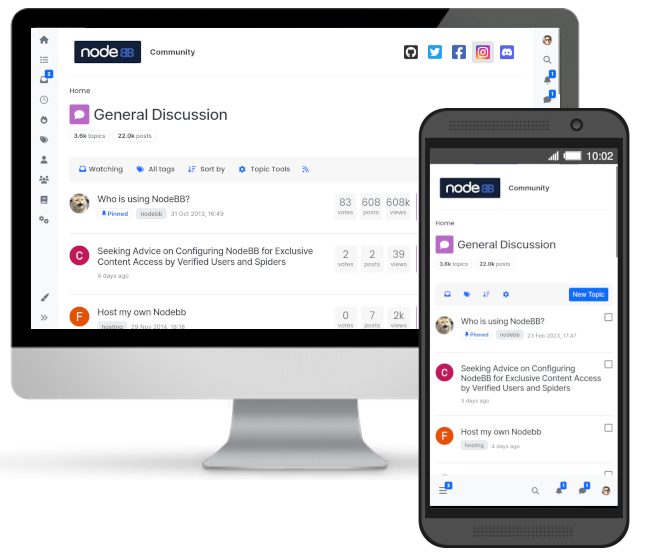
NodeBB Forum Software is powered by Node.js and supports either Redis, MongoDB, or a PostgreSQL database. It utilizes web sockets for instant interactions and real-time notifications. NodeBB takes the best of the modern web: real-time streaming discussions, mobile responsiveness, and rich RESTful read/write APIs, while staying true to the original bulletin board/forum format → categorical hierarchies, local user accounts, and asynchronous messaging.
NodeBB by itself contains a "common core" of basic functionality, while additional functionality and integrations are enabled through the use of third-party plugins.
Try it now | Documentation
Screenshots
NodeBB's theming engine is highly flexible and does not restrict your design choices. Check out some themed installs in these screenshots below:


Our minimalist "Harmony" theme gets you going right away, no coding experience required.
How can I follow along/contribute?
- If you are a developer, feel free to check out the source and submit pull requests. We also have a wide array of plugins which would be a great starting point for learning the codebase.
- If you are a designer, NodeBB needs themes! NodeBB's theming system allows extension of the base templates as well as styling via SCSS or CSS. NodeBB's base theme utilizes Bootstrap 5 as a frontend toolkit.
- If you know languages other than English you can help us translate NodeBB. We use Transifex for internationalization.
- Please don't forget to like, follow, and star our repo! Join our growing community to keep up to date with the latest NodeBB development.
Requirements
NodeBB requires the following software to be installed:
- A version of Node.js at least 20 or greater (installation/upgrade instructions)
- MongoDB, version 5 or greater or Redis, version 7.2 or greater
- If you are using clustering you need Redis installed and configured.
- nginx, version 1.3.13 or greater (only if intending to use nginx to proxy requests to a NodeBB)
- (Optional) Docker for container-based setup
Installation steps vary by operating system. Please follow the official documentation links above.
Installation
Please refer to platform-specific installation documentation. If installing via the cloud (or using Docker), please see cloud-based installation documentation.
Development Setup Overview
NodeBB uses a CLI-based setup and does not run via standard
npm start.
You can run NodeBB locally in two ways:
Option 1: Native Setup (Recommended for Beginners & Contributors)
This approach helps you understand how NodeBB works internally.
Basic flow:
- Clone the repository
https://github.com/NodeBB/NodeBB.git - Run the setup script
cd NodeBB./nodebb setup - Start the application
./nodebb start
During setup, you will configure:
- Database (MongoDB / Redis)
- Admin account
- Port (default: 4567)
Option 2: Docker Setup (Quick & Isolated)
Requires Docker to be installed: https://docs.docker.com/get-docker/
Run:
docker-compose up
This will start NodeBB along with required services at: http://localhost:4567
For more details, see: https://docs.nodebb.org
Securing NodeBB
It is important to ensure that your NodeBB and database servers are secured. Bear these points in mind:
- While some distributions set up Redis with a more restrictive configuration, Redis by default listens to all interfaces, which is especially dangerous when a server is open to the public. Some suggestions:
- Set
bind_addressto127.0.0.1so as to restrict access to the local machine only - Use
requirepassto secure Redis behind a password (preferably a long one) - Familiarise yourself with Redis Security
- Set
- Use
iptablesto secure your server from unintended open ports. In Ubuntu,ufwprovides a friendlier interface to working withiptables.- e.g. If your NodeBB is proxied, no ports should be open except 80 (and possibly 22, for SSH access)
Upgrading NodeBB
Detailed upgrade instructions are listed in Upgrading NodeBB
License
NodeBB is licensed under the GNU General Public License v3 (GPL-3) (http://www.gnu.org/copyleft/gpl.html).
Interested in a sublicense agreement for use of NodeBB in a non-free/restrictive environment? Contact us at sales@nodebb.org.
More Information/Links
- Demo
- Developer Community
- Documentation & Installation Instructions
- Help translate NodeBB
- NodeBB Blog
- Premium Hosting for NodeBB
- Unofficial IRC community – channel
#nodebbon Libera.chat - Follow us on Twitter
- Like us on Facebook