#  DemonEditor
[](LICENSE) 
### Enigma2 channel and satellite list editor for GNU/Linux.
[
DemonEditor
[](LICENSE) 
### Enigma2 channel and satellite list editor for GNU/Linux.
[ ](https://user-images.githubusercontent.com/7511379/103152885-4a7bd880-479d-11eb-96e8-4ad0f5dc3e2e.png)
Experimental support of Neutrino-MP or others on the same basis (BPanther, etc).
Focused on the convenience of working in lists from the keyboard. The mouse is also fully supported (Drag and Drop etc).
## Main features of the program
* Editing bouquets, channels, satellites.
[
](https://user-images.githubusercontent.com/7511379/103152885-4a7bd880-479d-11eb-96e8-4ad0f5dc3e2e.png)
Experimental support of Neutrino-MP or others on the same basis (BPanther, etc).
Focused on the convenience of working in lists from the keyboard. The mouse is also fully supported (Drag and Drop etc).
## Main features of the program
* Editing bouquets, channels, satellites.
[ ](https://user-images.githubusercontent.com/7511379/100156250-a3fc9900-2eb9-11eb-8729-7bcb6ddcdd4a.png)
* Import function.
[
](https://user-images.githubusercontent.com/7511379/100156250-a3fc9900-2eb9-11eb-8729-7bcb6ddcdd4a.png)
* Import function.
[ ](https://user-images.githubusercontent.com/7511379/103150878-8a38c500-4789-11eb-9e03-0c8ee832ff99.png)
* Backup function.
[
](https://user-images.githubusercontent.com/7511379/103150878-8a38c500-4789-11eb-9e03-0c8ee832ff99.png)
* Backup function.
[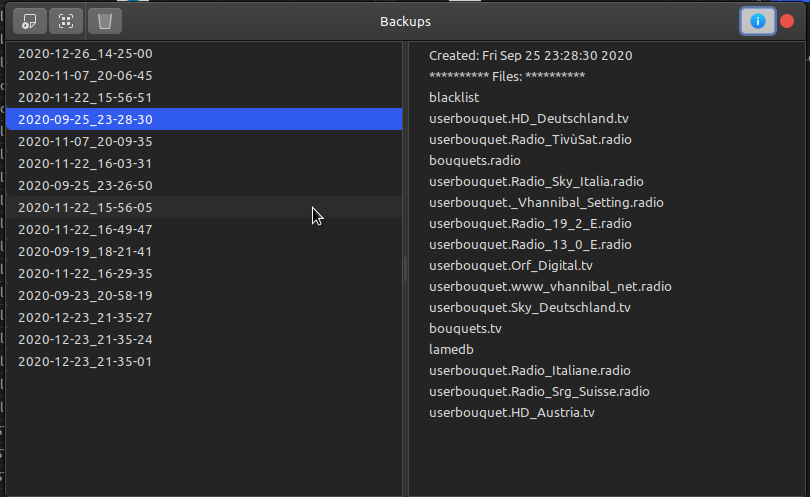 ](https://user-images.githubusercontent.com/7511379/103150886-a0df1c00-4789-11eb-88fa-91996b72d1f9.png)
* Support of picons.
[
](https://user-images.githubusercontent.com/7511379/103150886-a0df1c00-4789-11eb-88fa-91996b72d1f9.png)
* Support of picons.
[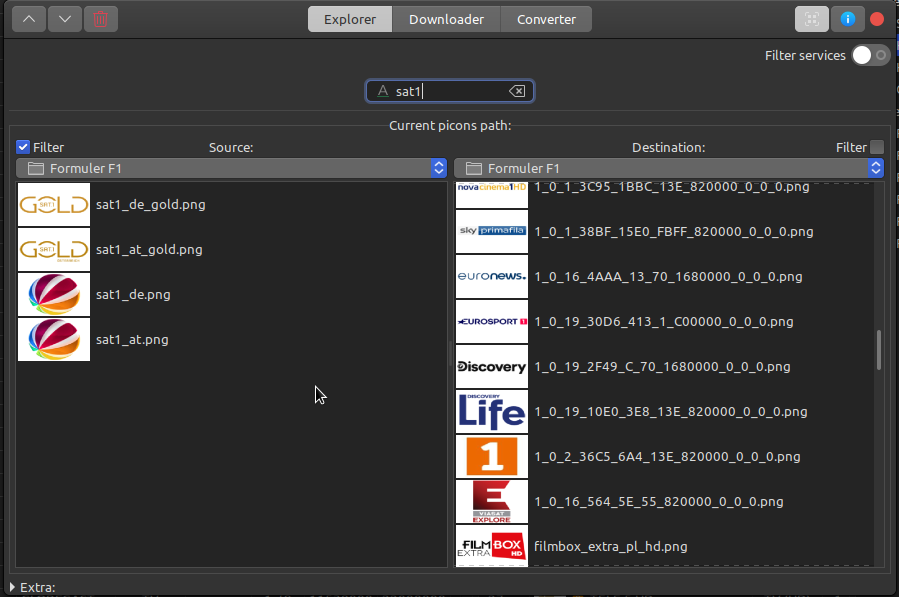 ](https://user-images.githubusercontent.com/7511379/103150891-accade00-4789-11eb-8804-e1807df89c99.png)
* Importing services, downloading picons and updating satellites from the Web.
[
](https://user-images.githubusercontent.com/7511379/103150891-accade00-4789-11eb-8804-e1807df89c99.png)
* Importing services, downloading picons and updating satellites from the Web.
[ ](https://user-images.githubusercontent.com/7511379/97909451-4c0ac080-1d59-11eb-9626-85bed91f7ccc.png)
[
](https://user-images.githubusercontent.com/7511379/97909451-4c0ac080-1d59-11eb-9626-85bed91f7ccc.png)
[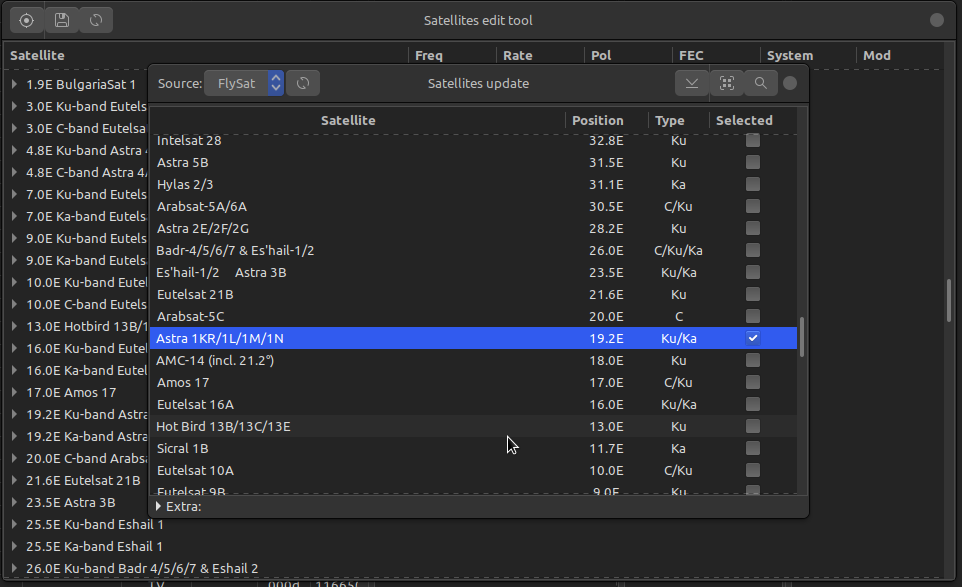 ](https://user-images.githubusercontent.com/7511379/103150872-77be8b80-4789-11eb-8a74-7a49fb3edd98.png)
* Extended support of IPTV.
* Import to bouquet(Neutrino WEBTV) from m3u.
* Export of bouquets with IPTV services in m3u.
* Assignment of EPG from DVB or XML for IPTV services (only Enigma2, experimental).
* Preview (playback) of IPTV or other streams directly from the bouquet list (should be installed [VLC](https://www.videolan.org/vlc/)).
[
](https://user-images.githubusercontent.com/7511379/103150872-77be8b80-4789-11eb-8a74-7a49fb3edd98.png)
* Extended support of IPTV.
* Import to bouquet(Neutrino WEBTV) from m3u.
* Export of bouquets with IPTV services in m3u.
* Assignment of EPG from DVB or XML for IPTV services (only Enigma2, experimental).
* Preview (playback) of IPTV or other streams directly from the bouquet list (should be installed [VLC](https://www.videolan.org/vlc/)).
[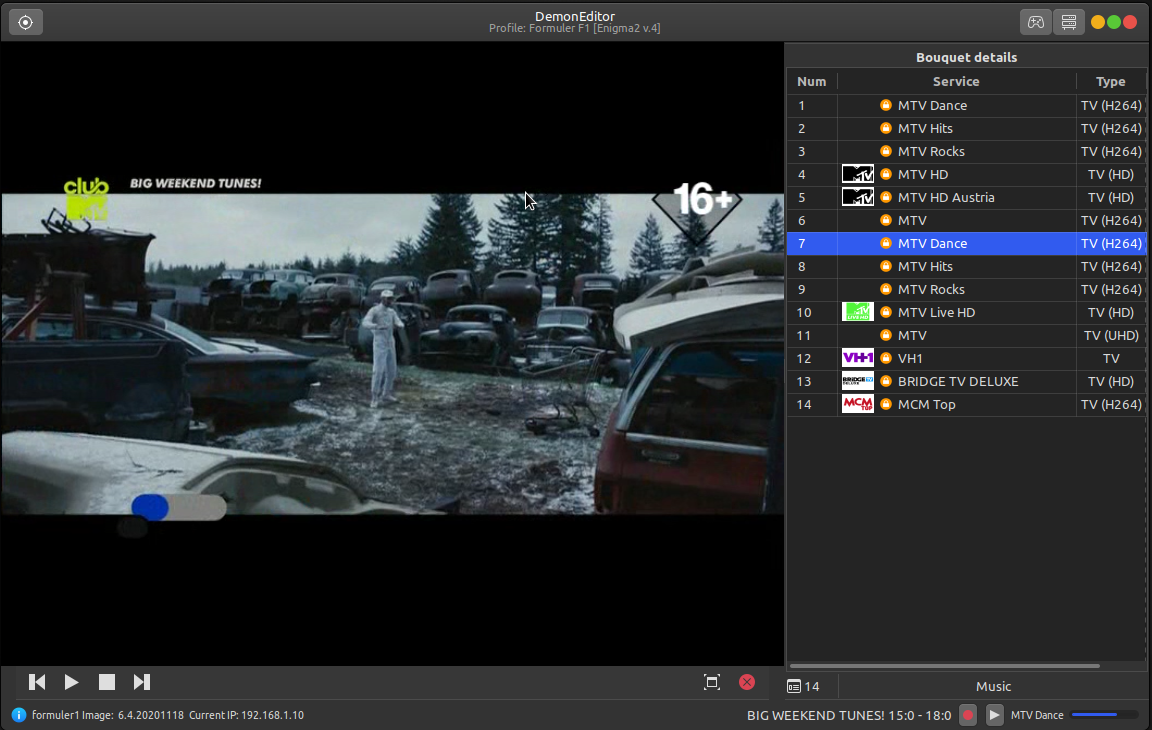 ](https://user-images.githubusercontent.com/7511379/103151911-89a52c00-4793-11eb-9941-8430f4e87eef.png)
* Control panel with the ability to view EPG and manage timers (via HTTP API, experimental).
[
](https://user-images.githubusercontent.com/7511379/103151911-89a52c00-4793-11eb-9941-8430f4e87eef.png)
* Control panel with the ability to view EPG and manage timers (via HTTP API, experimental).
[ ](https://user-images.githubusercontent.com/7511379/103150898-c79d5280-4789-11eb-9d16-e7f89225738b.png)
* Simple FTP client (experimental).
[
](https://user-images.githubusercontent.com/7511379/103150898-c79d5280-4789-11eb-9d16-e7f89225738b.png)
* Simple FTP client (experimental).
[ ](https://user-images.githubusercontent.com/7511379/103152009-7e9ecb80-4794-11eb-85f1-c97e189a3195.png)
#### Keyboard shortcuts
* **Ctrl + X** - only in bouquet list.
* **Ctrl + C** - only in services list.
Clipboard is **"rubber"**. There is an accumulation before the insertion!
* **Ctrl + Insert** - copies the selected channels from the main list to the bouquet
beginning or inserts (creates) a new bouquet.
* **Ctrl + BackSpace** - copies the selected channels from the main list to the bouquet end.
* **Ctrl + E** - edit.
* **Ctrl + R, F2** - rename.
* **Ctrl + S, T** in Satellites edit tool for create satellite or transponder.
* **Ctrl + L** - parental lock.
* **Ctrl + H** - hide/skip.
* **Ctrl + P** - start play IPTV or other stream in the bouquet list.
* **Ctrl + Z** - switch(**zap**) the channel(works when the HTTP API is enabled, Enigma2 only).
* **Ctrl + W** - switch to the channel and watch in the program.
* **Space** - select/deselect.
* **Left/Right** - remove selection.
* **Ctrl + Up, Down, PageUp, PageDown, Home, End**- move selected items in the list.
* **Ctrl + O** - (re)load user data from current dir.
* **Ctrl + D** - load data from receiver.
* **Ctrl + U/B** - upload data/bouquets to receiver.
* **Ctrl + I** - extra info, details.
* **Ctrl + F** - show/hide search bar.
* **Ctrl + Shift + F** - show/hide filter bar.
For **multiple** selection with the mouse, press and hold the **Ctrl** key!
## Minimum requirements
*Python >= 3.5.2, GTK+ >= 3.16 with PyGObject bindings, python3-requests.*
***Optional:** python3-gi-cairo, python3-pil, python3-chardet.*
## Installation and Launch
* ### Linux
To start the program, in most cases it is enough to download the [archive](https://github.com/DYefremov/DemonEditor/archive/master.zip), unpack
and run it by double clicking on DemonEditor.desktop in the root directory,
or launching from the console with the command:```./start.py```
Extra folders can be deleted, excluding the *app* folder and root files like *DemonEditor.desktop* and *start.py*!
To create a simple **debian package**, you can use the *build-deb.sh.* You can also download a ready-made *.deb package from the [releases](https://github.com/DYefremov/DemonEditor/releases) page.
Users of **LTS** versions of [Ubuntu](https://ubuntu.com/) or distributions based on them can use [PPA](https://launchpad.net/~dmitriy-yefremov/+archive/ubuntu/demon-editor) repository.
* ### macOS (experimental)
**This program can also be run on macOS.**
To work in this OS, you must use a [separate branch](https://github.com/DYefremov/DemonEditor/tree/experimental-mac).
**The functionality and performance of this version may be different from the Linux version!**
## Important
The program is tested only with [openATV](https://www.opena.tv/) image and **Formuler F1** receiver in [Linux Mint](https://linuxmint.com/) (MATE 64-bit) distribution!
Terrestrial(DVB-T/T2) and cable(DVB-C) channels are only supported for Enigma2.
Main supported *lamedb* format is version **4**. Versions **3** and **5** has only **experimental** support!
For version **3** is only read mode available. When saving, version **4** format is used instead.
When using the multiple import feature, from *lamedb* will be taken data **only for channels that are in the selected bouquets!**
If you need full set of the data, including *[satellites, terrestrial, cables].xml* (current files will be overwritten),
just load your data via *"File/Open"* and press *"Save"*. When importing separate bouquet files, only those services
(excluding IPTV) that are in the **current open lamedb** (main list of services) will be imported.
#### Command line arguments:
* **-l** - write logs to file.
* **-d on/off** - turn on/off debug mode. Allows to display more information in the logs.
## License
Licensed under the [MIT](LICENSE) license.
](https://user-images.githubusercontent.com/7511379/103152009-7e9ecb80-4794-11eb-85f1-c97e189a3195.png)
#### Keyboard shortcuts
* **Ctrl + X** - only in bouquet list.
* **Ctrl + C** - only in services list.
Clipboard is **"rubber"**. There is an accumulation before the insertion!
* **Ctrl + Insert** - copies the selected channels from the main list to the bouquet
beginning or inserts (creates) a new bouquet.
* **Ctrl + BackSpace** - copies the selected channels from the main list to the bouquet end.
* **Ctrl + E** - edit.
* **Ctrl + R, F2** - rename.
* **Ctrl + S, T** in Satellites edit tool for create satellite or transponder.
* **Ctrl + L** - parental lock.
* **Ctrl + H** - hide/skip.
* **Ctrl + P** - start play IPTV or other stream in the bouquet list.
* **Ctrl + Z** - switch(**zap**) the channel(works when the HTTP API is enabled, Enigma2 only).
* **Ctrl + W** - switch to the channel and watch in the program.
* **Space** - select/deselect.
* **Left/Right** - remove selection.
* **Ctrl + Up, Down, PageUp, PageDown, Home, End**- move selected items in the list.
* **Ctrl + O** - (re)load user data from current dir.
* **Ctrl + D** - load data from receiver.
* **Ctrl + U/B** - upload data/bouquets to receiver.
* **Ctrl + I** - extra info, details.
* **Ctrl + F** - show/hide search bar.
* **Ctrl + Shift + F** - show/hide filter bar.
For **multiple** selection with the mouse, press and hold the **Ctrl** key!
## Minimum requirements
*Python >= 3.5.2, GTK+ >= 3.16 with PyGObject bindings, python3-requests.*
***Optional:** python3-gi-cairo, python3-pil, python3-chardet.*
## Installation and Launch
* ### Linux
To start the program, in most cases it is enough to download the [archive](https://github.com/DYefremov/DemonEditor/archive/master.zip), unpack
and run it by double clicking on DemonEditor.desktop in the root directory,
or launching from the console with the command:```./start.py```
Extra folders can be deleted, excluding the *app* folder and root files like *DemonEditor.desktop* and *start.py*!
To create a simple **debian package**, you can use the *build-deb.sh.* You can also download a ready-made *.deb package from the [releases](https://github.com/DYefremov/DemonEditor/releases) page.
Users of **LTS** versions of [Ubuntu](https://ubuntu.com/) or distributions based on them can use [PPA](https://launchpad.net/~dmitriy-yefremov/+archive/ubuntu/demon-editor) repository.
* ### macOS (experimental)
**This program can also be run on macOS.**
To work in this OS, you must use a [separate branch](https://github.com/DYefremov/DemonEditor/tree/experimental-mac).
**The functionality and performance of this version may be different from the Linux version!**
## Important
The program is tested only with [openATV](https://www.opena.tv/) image and **Formuler F1** receiver in [Linux Mint](https://linuxmint.com/) (MATE 64-bit) distribution!
Terrestrial(DVB-T/T2) and cable(DVB-C) channels are only supported for Enigma2.
Main supported *lamedb* format is version **4**. Versions **3** and **5** has only **experimental** support!
For version **3** is only read mode available. When saving, version **4** format is used instead.
When using the multiple import feature, from *lamedb* will be taken data **only for channels that are in the selected bouquets!**
If you need full set of the data, including *[satellites, terrestrial, cables].xml* (current files will be overwritten),
just load your data via *"File/Open"* and press *"Save"*. When importing separate bouquet files, only those services
(excluding IPTV) that are in the **current open lamedb** (main list of services) will be imported.
#### Command line arguments:
* **-l** - write logs to file.
* **-d on/off** - turn on/off debug mode. Allows to display more information in the logs.
## License
Licensed under the [MIT](LICENSE) license.